
 Set as preferred source


The Web Content Accessibility Guidelines (WCAG) is the global standard for making digital content accessible. WCAG was developed by the World Wide Web Consortium (W3C).
WCAG set the international standard for making web content accessible to people with disabilities. WCAG underpins accessibility compliance requirements for countries and legislation around the world.
The main goal of WCAG is to ensure that digital content can be used by everyone, regardless of physical or cognitive limitations.
Is WCAG a law?
WCAG is not a law by itself. It's a technical standard.
WCAG becomes legally binding only when governments incorporate it into their laws and regulations.
Without this legal adoption, WCAG remains a professional and technical guideline.
WCAG becomes legally mandatory across most countries that way:
- W3C publishes a WCAG version as an official recommendation.
- Governments or regulators review the standard.
- Accessibility laws reference WCAG explicitly.
- Compliance becomes mandatory.
Typically, legislation includes wording such as: “Digital services must conform to WCAG X.X Level AA.” From that moment, WCAG gains legal authority in that jurisdiction.
Timeline of major WCAG versions
WCAG 1.0 - 1999
- First accessibility standard
- Focused on early HTML websites
- No longer used in regulation
WCAG 2.0 - 2008
- Introduced technology-neutral principles
- Became the first legally stable reference
- Widely adopted in laws worldwide
WCAG 2.1 - 2018
- Added mobile and cognitive accessibility
- Became the main global benchmark
WCAG 2.2 - 2023
- Incremental improvements
- Gradually being adopted in regulations
WCAG 3.0 - in development
- Major redesign
- No legal status yet
- Expected after 2028+
How WCAG is embedded in laws: regional examples
United States
U.S. accessibility laws (ADA, Section 508) do not define detailed technical rules. Instead, courts and regulators rely on WCAG as the benchmark.
In practice for today:
- Lawsuits → reference WCAG
- Non-compliance → evidence of discrimination
- Most cases use WCAG 2.0 or 2.1 AA
WCAG functions as “de facto law” through case law.
European Union
In the EU, WCAG is embedded through: The European Accessibility Act, EN 301 549 technical standard. These documents directly require WCAG compliance.
Application:
- Public sector: mandatory since 2018-2020
- Private sector: large-scale enforcement from 2025
United Kingdom
After Brexit, the UK retained the EU model: WCAG 2.1 Level AA is mandatory for public bodies. Private sector enforcement occurs through litigation.
Canada, Australia, Japan
These countries use national accessibility acts that reference WCAG 2.x as the technical standard. Although the laws differ, WCAG remains the core compliance framework.
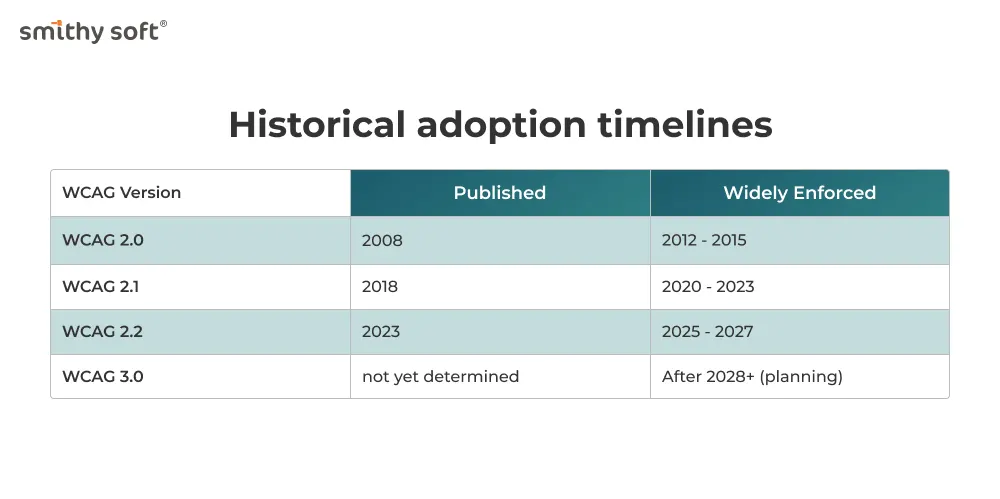
On average: it takes 4-7 years for a WCAG version to become fully enforceable worldwide.
The special role of courts
Even when WCAG is not formally written into law, courts often use it as an expert reference. Judges rely on WCAG to determine whether “reasonable accessibility” exists. As a result:
- Companies may lose cases even without explicit WCAG references in statutes
- WCAG functions as a professional legal benchmark
This is especially common in the United States and the UK.
Why WCAG 2 is no longer enough
While WCAG 2.x has been successful, it has limitations:
- Binary pass/fail logic
Criteria are either met or not met, which does not reflect real user experience.
- Limited coverage of cognitive disabilities
Many cognitive and neurological needs are poorly addressed.
- Poor scalability to new technologies
AR/VR, voice interfaces, AI systems, and complex apps are not well covered.
- Testing complexity
Many criteria are hard to interpret consistently.
- Desktop-centric origins
WCAG 2.x was designed before mobile-first and app-centric design.
WCAG 3.0 is designed to solve these problems.
What is WCAG 3.0?
WCAG 3.0 (also called “W3C Accessibility Guidelines” in drafts) supports a wide set of user needs, uses new approaches to testing, and allows frequent maintenance of guidelines and related content to keep pace with accelerating technology changes. WCAG 3.0 supports this evolution by focusing on the functional needs of users.
WCAG 3.0 is a successor to Web Content Accessibility Guidelines 2.2 and previous versions, but does not deprecate WCAG 2. It will also incorporate some content from and partially extend User Agent Accessibility Guidelines 2.0 and Authoring Tool Accessibility Guidelines 2.0.
There are many differences between WCAG 2 and WCAG 3.0. The WCAG 3.0 guidelines address the accessibility of web content on desktops, laptops, tablets, mobile devices, wearable devices, and other Web of Things devices.
Whilst WCAG 2.2 applies primarily to web pages, WCAG 3.0 aims to support:
- Augmented/Virtual reality
- Digital content e.g. Office documents and presentations, PDFs
- Authoring tools e.g. Content Management Systems (CMSs) such as WordPress, Adobe Experience Manager
- User agents e.g. browsers and assistive technologies
- Software including mobile apps
- Web applications e.g. Google Docs, Office 365
- Operating systems
The guidelines apply to various types of web content, including static, dynamic, interactive, and streaming content; visual and auditory media; virtual and augmented reality; and alternative access presentation and control methods. These guidelines also address related web tools such as user agents (browsers and assistive technologies), content management systems, authoring tools, and testing tools.
Content that complies with WCAG 2.2 Level A and Level AA is expected to meet most of the minimum requirements of this new WCAG 3.0 standard, but will also include additional tests and different assessment mechanisms.
Key changes in WCAG 3.0
1. From success criteria to outcomes
WCAG 2.x is based on detailed “success criteria.”
WCAG 3.0 focuses on outcomes: what users should actually be able to do.
Example: Instead of “Text must have contrast ratio 4.5:1” focus: “Users with low vision can read content comfortably”. This shifts attention from technical compliance to real usability.
2. Scoring system instead of pass/fail
WCAG 3.0 introduces a rating model. Instead of “compliant / non-compliant,” products may receive scores based on:
- Level of support
- Consistency
- Quality of implementation
These can allow for differing levels of conformance. For example, satisfying all of the foundational requirements is intended to be broadly equivalent to the existing WCAG 2.2 AA standard.
3. Modular guidelines
WCAG 3.0 uses a modular structure:
- Core accessibility requirements
- Technology-specific modules
- Disability-focused modules
This makes it easier to update parts of the standard without rewriting everything.
4. Better support for cognitive accessibility
WCAG 3.0 significantly expands guidance for:
- Memory limitations
- Attention disorders
- Dyslexia
- Autism spectrum conditions
- Learning disabilities
This is one of the most important improvements.
5. Platform independence
WCAG 3.0 is designed to work across:
- Web
- Mobile apps
- Desktop software
- IoT interfaces
- AR/VR
- Voice assistants
It reflects today’s multi-platform reality.
6. Improved testing and evaluation
Testing under WCAG 3.0 is expected to be:
- More consistent
- More user-centered
- Less ambiguous
- Better aligned with automated tools
This should reduce disputes over interpretation.
7. Plain language
A frequent concern with WCAG 2.0 is the inaccessibility of the documentation; it is often technical and can be challenging to read – even for people familiar with them.
WCAG 3.0 has introduced plain language summaries for key sections of the specification to address this concern and make content easier to read.
Some practical features of WCAG 3.0
1. From technical rles to user-centered outcomes
In WCAG 2.x, compliance is based on narrowly defined technical rules: minimum contrast ratios, specific keyboard behaviors, exact ARIA patterns, fixed text alternatives/
Example: “Text must have a contrast ratio of at least 4.5:1.” This encourages “checkbox compliance,” where teams focus on passing audits rather than improving usability.
WCAG 3.0 replaces rigid rules with user outcomes.
Instead of asking: “Did we meet this technical threshold?” It asks: “Can users with low vision reliably read and understand this content?”
Practical impact:
- Teams must validate real usability, not just numbers
- Manual testing becomes more important
- User feedback gains regulatory relevance
- Design intent matters more than formal metrics
- Accessibility becomes experience-driven rather than rule-driven.
2. Weighted scoring instead of pass/fail compliance
Today, audits are binary:
- Pass = compliant
- Fail = non-compliant
One missing alt attribute can technically break compliance.
WCAG 3.0 introduces a graded scoring system.
Each accessibility area is evaluated based on:
- Coverage
- Consistency
- Quality
- Reliability
Results may look like:
- Visual accessibility: 85%
- Keyboard access: 70%
- Cognitive support: 60%
Practical impact:
- Partial improvements are recognized
- Progress can be measured over time
- Management can prioritize based on risk
- Accessibility becomes a KPI
- This aligns accessibility with modern quality assurance models.
3. Modular requirements by technology and disability
Problem in WCAG 2.x: all rules are bundled together, regardless of platform, device, user group. This makes the standard hard to apply to complex systems.
WCAG 3.0 is structured into modules:
- Core requirements (apply everywhere)
- Platform modules (web, mobile, desktop, VR, etc.)
- Disability-focused modules (vision, cognitive, motor, hearing)
Practical impact:
- Teams only apply relevant modules
- Compliance becomes context-aware
- Specialized products get tailored guidance
- Updates become faster and more flexible
Example: a VR training app will not be evaluated by the same rules as a marketing website.
4. Formal support for cognitive accessibility
WCAG 2.x provides limited support for: ADHD, dyslexia, autism, memory disorders, processing difficulties. Most guidance is vague and optional.
WCAG 3.0 includes detailed requirements for:
- Clear task flows
- Reduced cognitive load
- Predictable navigation
- Simplified language
- Error prevention
- Assisted decision-making
Practical impact:
- UX writing becomes part of compliance
- Information architecture matters legally
- Complex interfaces face higher scrutiny
- Content strategy affects accessibility scores
Accessibility now includes mental effort, not just physical access.
5. Continuous accessibility instead of one-time audits
Most organizations operate on a “scan-and-fix” model: annual audit, remediation sprint, report, repeat next year. This creates cycles of degradation.
WCAG 3.0 encourages continuous evaluation. Key elements:
- Ongoing monitoring
- Versioned accessibility reports
- Change-impact analysis
- Trend tracking
Practical impact:
- Accessibility is integrated into CI/CD
- Releases require accessibility validation
- Regression tracking becomes standard
- Long-term compliance becomes manageable
Accessibility becomes part of DevOps.
6. Expanded testing methodology
Testing today relies on: automated tools, manual checklists, limited assistive tech testing. Results often vary between auditors.
WCAG 3.0 defines structured testing layers:
- Automated validation
- Expert manual testing
- Assistive technology verification
- User scenario testing
- Context-based evaluation
Practical impact:
- Audit reports become more standardized
- Disputes decrease
- Results are more defensible in court
- Testing costs increase but become more reliable
Audits shift from “tool-based” to “evidence-based.”
7. Accessibility integrated into design systems
Many teams retrofit accessibility at the end. Components are often fixed after implementation.
WCAG 3.0 aligns strongly with design systems. Accessible components must be:
- Pre-tested
- Documented
- Versioned
- Audited
- Reusable
Practical impact:
- Accessibility moves to the design phase
- Component libraries become compliance assets
- Reusable patterns reduce legal risk
- Governance becomes centralized
Design systems become compliance infrastructure.
8. Evidence-based compliance documentation
Typical reports today list: failed criteria, screenshots, tool outputs. They rarely show real user impact.
WCAG 3.0 emphasizes compliance evidence:
- User journey validation
- Testing protocols
- Assistive technology logs
- Performance metrics
- Improvement records
Practical impact:
- Reports resemble quality dossiers
- Legal defensibility improves
- Audits become strategic assets
- Documentation workload increases
Compliance becomes auditable proof, not just claims.
9. Stronger connection to product governance
WCAG 3.0 connects accessibility to management systems. Expected practices include:
- Named accessibility owners
- Executive reporting
- Risk assessments
- Budget allocation
- Policy enforcement
Practical impact:
- Accessibility becomes a board-level topic
- Product managers gain legal responsibility
- Compliance is embedded in governance
- Informal processes disappear
Accessibility becomes an organizational system, not a team task.
10. Platform-neutral application in real products
WCAG 3.0 is designed for:
- Web platforms
- Native mobile apps
- SaaS tools
- Desktop software
- Smart devices
- AR/VR systems
- Voice interfaces
Practical impact:
- One framework for all digital products
- Cross-platform audits become possible
- Compliance scales with ecosystems
- Fragmentation is reduced
Organizations no longer manage separate accessibility regimes.
Practical example: WCAG 2.x vs WCAG 3.0 in real life
Under WCAG 2.x a banking app might pass because:
- Buttons are labeled
- Contrast is sufficient
- Forms are keyboard-accessible
- Even if users struggle to complete tasks.
Under WCAG 3.0 the same app would be evaluated on:
- Can users understand financial terms?
- Can they recover from errors?
- Can they complete transfers independently?
- Can they verify transactions confidently?
- Technical correctness alone is insufficient.
What this means for teams:
Designers:
- Must validate cognitive load
- Must design predictable flows
- Must document accessibility intent
Developers:
- Must build testable components
- Must support assistive technologies deeply
- Must maintain accessibility APIs
QA Engineers:
- Must run multi-layer testing
- Must document evidence
- Must validate user outcomes
Managers:
- Must govern accessibility programs
- Must track metrics
- Must fund long-term compliance
What is the release date of WCAG 3.0?
WCAG 3.0 is currently published as a Working Draft, which reflects that there is still a lot of work being done. This is an iterative process, and there will be more revisions to this working draft as work continues.
The 4 stages the guidelines progress through are:
- First working draft (Published in Jan 2021)
- Revised working draft (first published in June 2021, and most recently in September 2025). This is the current stage. It is likely that there will be multiple more revisions before progressing to stage 3.
- Candidate recommendation. Anticipated in Q4 of 2027.
- W3C recommendation. This is a W3C endorsed specification, and ready for use. By the current timelines, this will not be earlier than 2028.
Conclusions
At present, organisations should continue to treat WCAG 2.2 as the de facto standard for web accessibility. A website that is WCAG 2.2 AA conformant is likely to be broadly conformant to WCAG 3.0's core requirements.
WCAG 3.0 is still in development, and is likely due for release no earlier than 2028.
What to do now?
- Achieve WCAG 2.2 AA compliance
- Start user testing
- Document processes
If the steps to achieve WCAG compliance seem complicated to you, don't despair. We'll help you figure it out – SmithySoft offers the full spectrum of Accessibility Analysis!