
 Set as preferred source


“Story mapping is a better way to work with Agile user stories. It’ll keep your users and what they’re doing with your product front and center in your products. That’s better than getting lost in feature arguments – like what normally happens in software development. I’m not making any promises here, but if you use Story Mapping, I believe your products will ultimately be better” – Jeff Patton.
Story Mapping is a tool created by Jeff Patton (author of the book “User Story Mapping”), whose leading idea is to tell stories (hence the notion of “Story”), in a collaborative way, with words and images, with the aim of building a mutual understanding of a given situation. According to the author, this isn’t just another tool for managing a backlog – it’s a mindset. It’s about viewing your product through the real needs of the people who actually use it.
What Is User Story Mapping?
User story mapping is a visualization of the journey a customer takes with a product, from beginning to end. It includes all the tasks they’d typically complete as part of that journey.
The user story tool allows you to establish multiple levels and dimensions for a product backlog through the breakdown of user needs as user activities, user tasks, epics and user stories.
A user story map is built around user stories – short, simple descriptions of a feature from the end-user’s perspective (e.g., “As a customer, I want to save items to a wishlist so I can buy them later”). These stories are arranged in a two-dimensional map:
- Horizontally to represent the user journey or workflow.
- Vertically to prioritize features and decide what should be included in the next release.
Arranging user stories beneath significant steps in chronological order helps prioritize and organize work efficiently.
What Isn’t User Story Mapping?
While user story mapping is a powerful Agile practice, it’s important to clarify what it is not — to avoid common misconceptions.
It’s not just another Backlog Tool. A traditional backlog is a flat, prioritized list of tasks or features. Story mapping, on the other hand, adds context by showing how those tasks fit into the user’s journey.
It’s not a Product Roadmap. While a roadmap communicates long-term strategy, milestones, and goals, a story map shows the detailed user journey and how upcoming work ties directly to user needs. Both tools are complementary, but they serve different purposes.
It’s not Journey Mapping. Journey mapping is a UX technique for visualizing the broader customer experience across multiple touchpoints with a brand or product. User story mapping, on the other hand, is a product development tool that links user actions directly to features, helping teams plan releases and structure backlogs.
It’s not a one-time exercise. Story mapping is meant to evolve as your product and customer needs change. Treating it as a static artifact removes its value.
It’s not only for product managers. Effective story mapping requires collaboration across the team – developers, designers, testers, and business stakeholders.
How to Create a User Story Map
Let’s start by identifying the users and individual stories. Users are the people for whom you are building the product – they can be customers, employees, or business owners. Stories are the specific actions they take within your product, ranging from simple tasks to more complex and detailed interactions.
Once you’ve identified these elements, you can begin mapping. The process starts by arranging the user’s interactions with the product in sequence. Then, assign the individual actions the user takes while engaging with your app or website to each interaction. Each tile represents a separate story, which should be placed in the right spot on the map according to its stage in the process and its priority.
What Tools Will You Need for Creating a User Story Map?
Creating a user story map can be done with physical tools or digital tools, depending on your team’s needs and setup.
- Physical Tools:
- Sticky Notes + Wall: A classic approach. Ideal for collaborative, in-person sessions. They’re flexible and easy to move around, but documenting them afterward can be tricky.
- Whiteboards: Useful for quick mapping sessions and visualizing workflows, though space can be limited.
- Digital Tools:
| Tool | Category | Best Suited For | Jira Integration |
|---|---|---|---|
| Miro | Virtual Whiteboard | Remote Creative Teams | Basic |
| MURAL | Virtual Whiteboard | Remote Creative Teams | Basic |
| StoriesOnBoard | Specialized Tool | Continuous Story Map Management | Deep, Two-Way |
| Avion | Specialized Tool | Simple Visualization with Integrations | Yes |
| Easy Agile TeamRhythm | Jira Plugin | Teams Working Directly in Jira | Native |
| Trello | Project Management Tool | Teams Needing Flexible Visual Boards | Basic |
| Asana | Project Management Tool | Teams Needing Flexible Visual Boards | Basic |
| ClickUp | Project Management Tool | Teams Needing Flexible Visual Boards | Basic |
Selecting the best tool depends on your team’s setup and workflow. For in-person sessions, physical tools like sticky notes and whiteboards work well. For remote teams or frequent reviews, digital tools like Miro, MURAL, or specialized story mapping platforms provide flexibility, collaboration, and easy documentation. The key is to pick a tool that supports your process without limiting how your team visualizes and organizes the user journey.
The User Story Mapping Process
Step 1. Choose Your Platform and Team
Select the tool that feels most comfortable for creating your user story map. Pick from the list of physical or digital tools we discussed earlier.
Step 2. Identify Users and Goals
Start by defining who your users are – customers, employees, or business owners – and what they want to achieve with your product. The result of this work should be a step-by-step plan for the client that answers the key question: “What will the user do with the product?”
Step 3. Group the user actions
At this stage, when you have identified the main actions users take when dealing with your product, you can move on to grouping them. Map out the main activities users perform to reach their goals. For example, in an e-commerce app: browse products, add items to the cart, checkout, and track orders.
Step 4. Write User Stories
Under each activity, write individual user stories describing specific actions from the user’s perspective. Each story should capture a real task or need.
Step 5. Organize and Prioritize
Arrange stories horizontally by user flow and vertically by priority. This helps visualize which features are most important for early releases and which can come later.
This approach helps with both feature prioritization and sprint planning. Horizontal: Organize stories left to right in the sequence users would naturally perform them. Vertical: Arrange stories from top to bottom in order of priority, by value to the user. You can identify the value through conversations with users, analytics on usage patterns, or another form of insight appropriate for your product.
Think of it like building a house. The foundation (must-haves) comes first, then the walls (should-haves), and finally the decorative touches (nice-to-haves).
Step 6. Plan Releases
Slice the map into increments or releases. This ensures the team delivers valuable functionality step by step, instead of building everything at once.
Step 7. Collaborate and Refine
Review the map with your team and stakeholders, gather feedback, and adjust as needed. This ensures everyone shares a common understanding of user needs and product vision.
Step 8. Get your priorities right
Now it's time to prioritise your teamwork. Decide what needs to be done first and what you can leave for later and implement as you are able. Remember, you must look at the product from the perspective of the CLIENT, not from the perspective of the developer or marketologist. Send the completed USM to each team member so that it is always in a visible place.
Step 9. Keeping your story map alive
Your user story map shouldn't be a one-time exercise that gets filed away. It should evolve as your understanding of users deepens. Updating it regularly: add new insights from customer feedback, adjust priorities based on learnings, mark completed items, note changes in user needs or behavior.
User Story Mapping in Practice
- Example for e-commerce (a case by Krystian Kaczor, professional Scrum Trainer at QAgile)
Example: An e-commerce team was working on a mobile app for a clothing store. The initial backlog contained over 2,000 user stories with no logical order.
Challenge: The team didn’t know where to start. The Product Owner had a vision of “an app like Zalando” but lacked a concrete plan. Developers were frustrated by the lack of context.
Process: The mapping session lasted half a day. We identified the main user activities:
- Discovering products
- Viewing details
- Adding items to the cart
- Completing the order (Checkout)
- Tracking the order
- Handling returns
Result: The map revealed that 70% of the backlog focused on “discovering products” (search, filters, recommendations), while other key activities were underrepresented. After reorganizing the backlog, the team delivered a working app in 3 months instead of the planned 6. Moreover, the first release effectively solved the main user problems and generated sales from day one. Teams achieved a more stable velocity, making release forecasts more predictable.
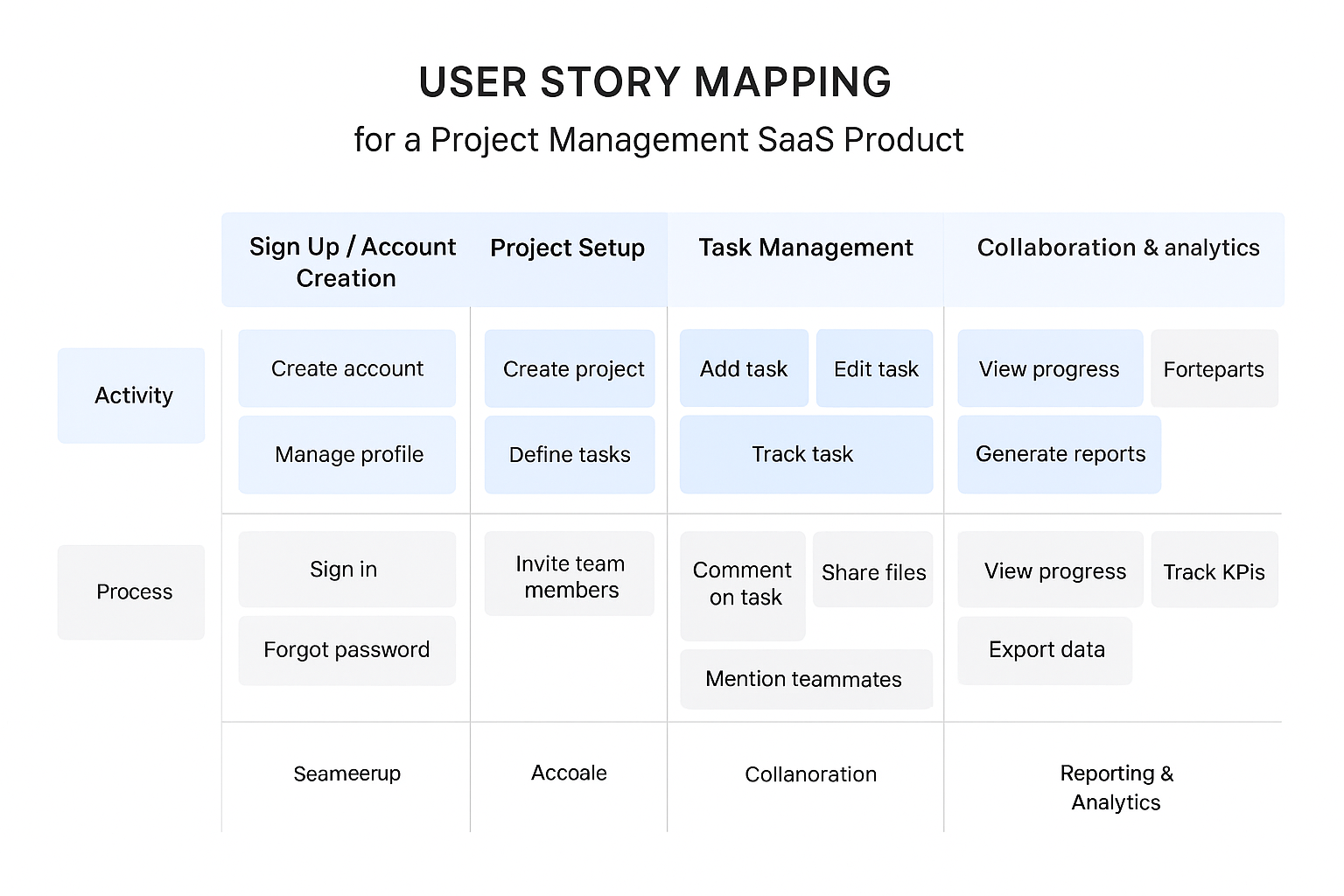
- Example for a SaaS Product (by AI)
Scenario: A team is building a project management SaaS app for small businesses. The initial backlog contains over 500 user stories, but they are scattered and lack a clear logical order.
Challenge: The team doesn’t know where to start. The Product Owner envisions “an all-in-one management platform,” but without a concrete roadmap. Developers feel frustrated due to the lack of context and prioritization.
Process:
The team organizes a half-day story mapping session to identify the main user activities:
Sign Up / Account Creation – Users need to create accounts and manage profiles.
Project Setup – Users create projects, define tasks, and assign team members.
Task Management – Users add, edit, and track tasks.
Collaboration – Users communicate, share files, and comment on tasks.
Reporting & Analytics – Users view progress, generate reports, and track KPIs.
For each activity, the team writes user stories that represent specific actions and needs. Then, they organize the stories on the map horizontally by the user journey and vertically by priority.
Result:
The story map revealed that 60% of the backlog was focused on task management, while key onboarding and reporting features were underrepresented. After reorganizing the backlog and prioritizing core user flows, the team delivered a working MVP in 2 months instead of the originally planned 4. The first release addressed the main user pain points, improved adoption rates, and allowed the team to gather real user feedback for the next iterations.
Key Takeaway:
User story mapping helped the team visualize the entire user journey, focus on what really matters, and plan incremental releases effectively. This method ensures that both user value and development efficiency are maximized from the very first release.
User Story Mapping vs Product Backlog
A user story is a concise, simple description of a feature told from the perspective of the person who desires the new capability, usually a user or a customer of the system. It’s like a brief statement of intent for a particular feature that focuses on the value or result it provides.
A product backlog is a comprehensive list of all the tasks, features, and improvements that need to be completed to deliver a product. Think of it as a to-do list for your product development process, but it’s not just any to-do list. It’s a dynamic, evolving artifact that provides a holistic view of everything that can be done to make the product better.
A product backlog is made up of many different items, which can include user stories, but also bugs, tasks, and other work items. A user story, on the other hand, is a single item that could be part of a product backlog. It’s a specific requirement or feature, described from the perspective of the end user.
Can Story Maps Replace Product Backlogs?
Product development tools aren’t one-size-fits-all. Story maps and product backlogs each play a unique role in creating successful products, but they’re not interchangeable.
Story maps and product backlogs might seem similar, but they serve different purposes. Story maps visualize the entire user journey, showing how features connect and providing a holistic view of the product experience. Product backlogs, on the other hand, list specific tasks and features, prioritize work items, and guide day-to-day development efforts.
Story maps help teams understand the user’s complete experience, revealing the “why” behind your product. Product backlogs focus on specific implementation tasks, sprint planning, and tracking progress.
Successful teams use story maps to define the overall product vision and then translate these insights into backlog items. They regularly review and align both tools, ensuring every backlog item connects to the broader user journey.
Conclusions
User story mapping helps you better understand how users use an app or website. By creating maps that describe individual user stories, you can better understand their needs and expectations. Ultimately, you will create a practical and desirable product.
If you are interested in creating user story mapping for your mobile or web app and are not sure how to proceed, we are happy to help!